
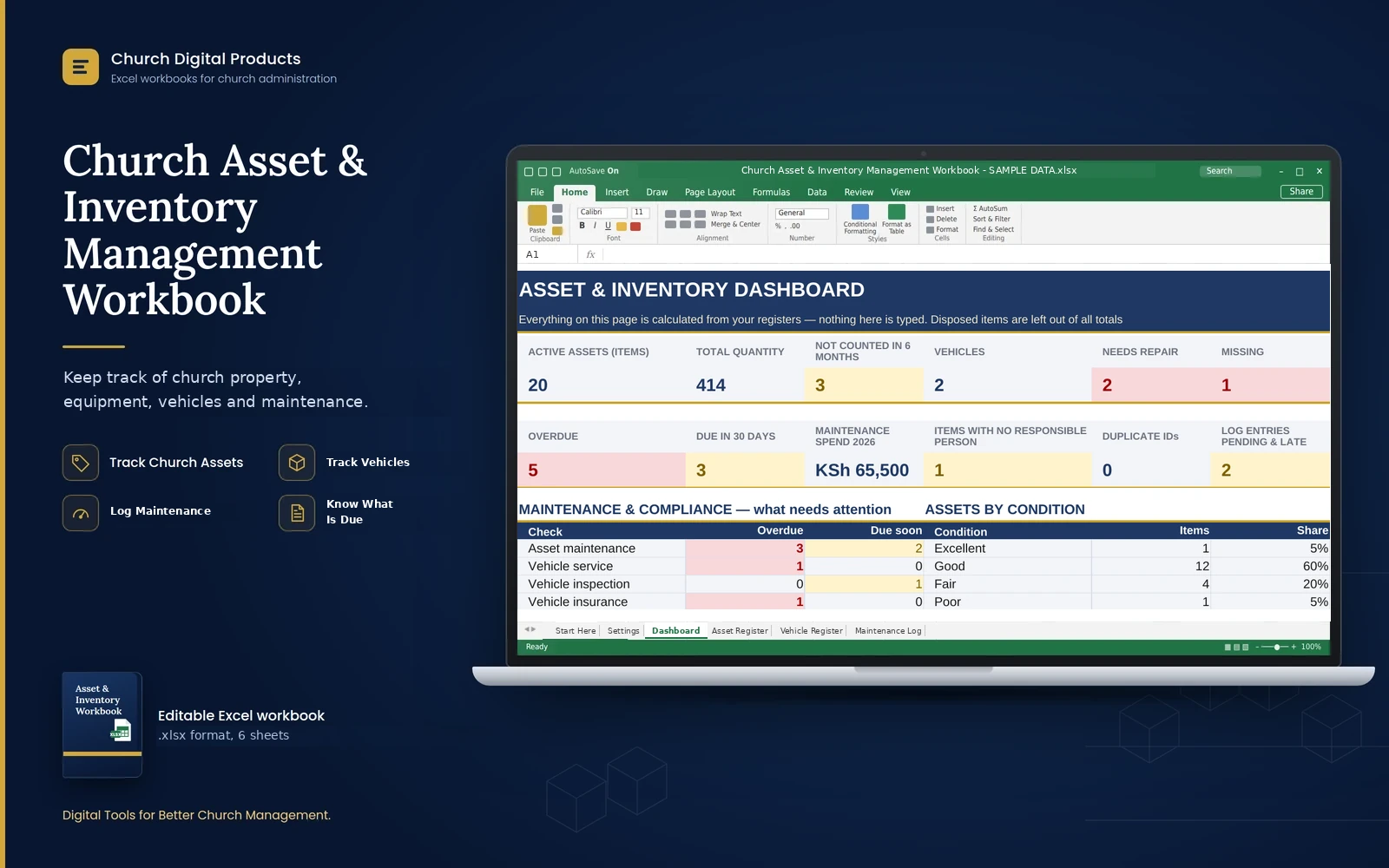
Church Asset & Inventory Management Workbook
An Excel workbook to record your church's assets and vehicles, log every repair, and see what is overdue, what needs repair and what your items are worth.
Price
Kshs. 599
Cart coming soon. Online ordering is not open yet.
What it is
The problem it solves
Who it is for
- Church administrators and secretaries who keep the property list
- Stewards and property committee members
- Treasurers who need an asset list for audits and insurance
- Media, music, kitchen and ushering team leaders who look after equipment
- Small and medium churches of any denomination, with no Excel expertise needed
Key benefits
- Know what the church owns, where each item is and who looks after it
- See what is overdue, due soon, under repair or missing on one Dashboard
- Record each repair once, and the next due dates fill in by themselves
- See vehicle insurance, inspection and service dates turn amber and red before they lapse
- Spot items nobody is responsible for, repeated IDs and items not counted in six months
- See what repairs and services cost each year
- Record what items cost and see their total value for audits and insurance
- Mark sold or discarded items as Disposed: they stay on record but leave the totals
- Set up in about 10 minutes
Key features
- Start Here menu with a workbook map, and Settings with the alert window and every dropdown list
- Asset Register for up to 1,000 items or batches, with category, location, responsible person, serial number, condition, status and physical count date
- Condition and status colour themselves, and disposed items turn grey
- Optional cost per item, with the total value worked out
- Vehicle Register for up to 200 vehicles, with insurance expiry, inspection due and service dates
- Maintenance Log for up to 1,000 entries, with date, work done, who did it, cost and next due date
- Next maintenance and next service dates that fill in from the log
- Dashboard with twelve key figures, a maintenance and compliance table, and breakdowns by condition, category and status
- Asset value block and a chart of assets by condition
- Alert window you can set (30 days to start), and a spending year that follows the calendar
- Editable lists for categories, conditions, statuses, locations and maintenance status
Good to know
- It works best in Microsoft Excel on a computer (a recent version is recommended) and also opens in LibreOffice Calc. Phones can open it, but typing records there is awkward.
- You type the entries yourself. It does not use barcodes or a phone app, and it does not connect to accounting software.
- It is a register of assets, not a stock-control system. It does not track consumable stock such as cups, paper or bulbs, or reorder levels.
- It records what items cost, not their market value or replacement cost. Check cover and values with your insurer.
- It warns you with colours and counts on the Dashboard. It does not send emails or messages.
- Names of the people responsible for items are personal data. Keep the file in a safe place and share it only with people who need it.
- Sheets are protected against accidental changes, but the protection has no password. Excel does not record who changed what.
- Capacity: 1,000 assets, 200 vehicles and 1,000 maintenance entries. The registers print their first 100 rows (50 for vehicles); use Print Selection for more.
- After you download it, open the file and click Enable Editing.
Frequently asked questions
Do I need to be good at Excel?
No. You add one row for each item, vehicle and repair, and the workbook does the counting and the colouring. The manual explains every step in plain language.
Can it track consumables such as cups or paper, or reorder levels?
No. It is a register of assets, such as chairs, instruments, equipment and vehicles. It records how many of each you have, not stock coming in and going out.
Can I record many identical items on one row?
Yes. Type the number in Quantity. If you also type the cost of one item, the workbook works out the total value.
Do I have to enter next-due dates in two places?
No. You record each repair once in the Maintenance Log, with a Next Due Date if it is due again. The registers and the Dashboard pick it up by themselves.
Will it remind me before insurance or an inspection expires?
Dates turn amber when they come within your alert window (30 days to start) and red once they have passed, and the Dashboard counts them. It does not send emails or messages.
What if an item is sold or thrown away?
Set its Status to Disposed. The row turns grey and leaves all totals, but it stays on record.
What is the SAMPLE DATA copy for?
It is a practice file for a made-up church, with items, vehicles and repairs filled in, so you can see every sheet working. Never use it for real records.
Can more than one person use it?
Share the file with your authorized officers, but let one person edit at a time, and keep a dated backup every month.