
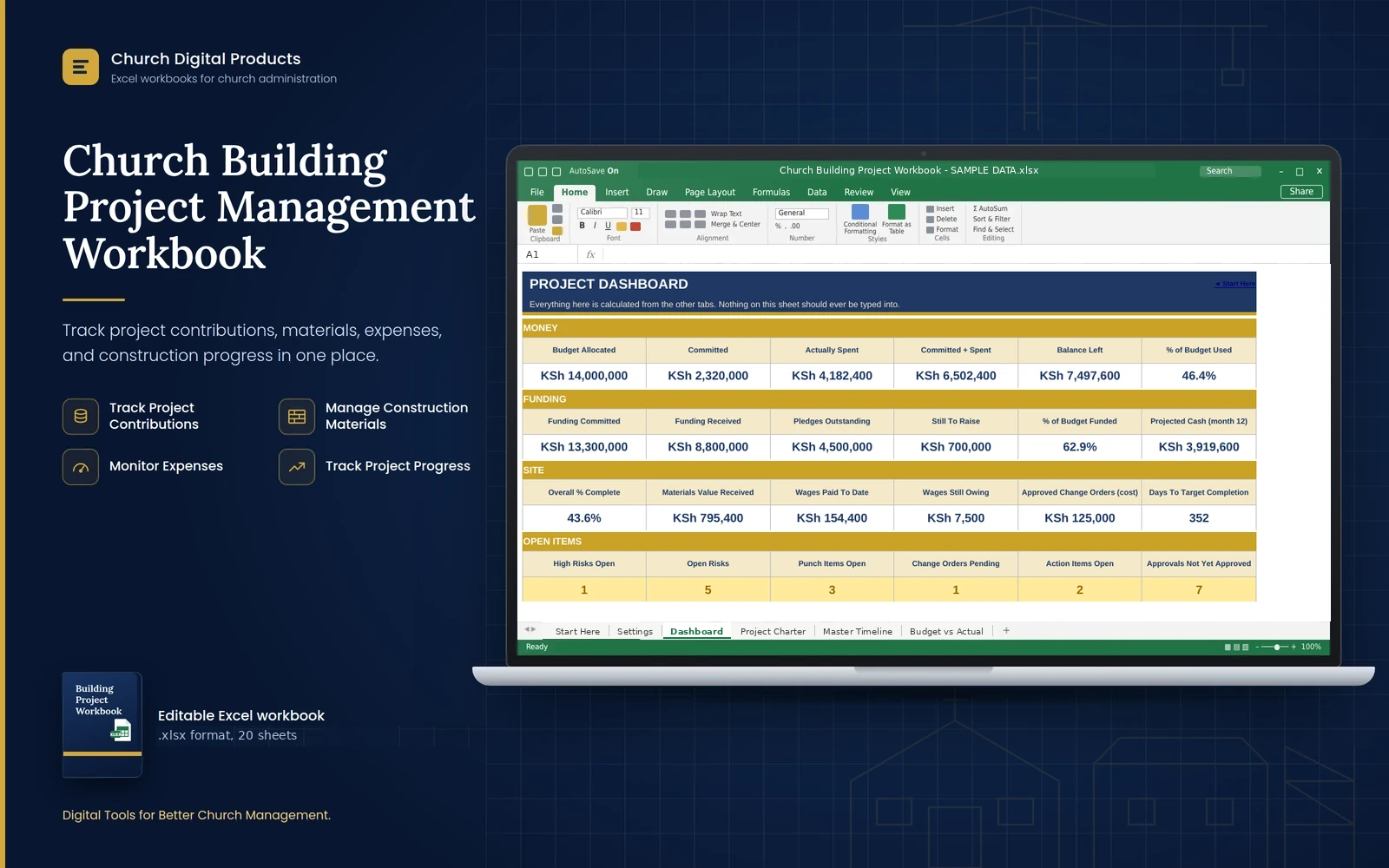
Church Building Project Management Workbook
An Excel workbook to plan, budget and manage a church building project, with funding, orders, materials, wages, approvals, risks and a ready-to-print committee report.
Price
Kshs. 999
Cart coming soon. Online ordering is not open yet.
What it is
The problem it solves
Who it is for
- Building committee chairs, treasurers and secretaries
- Church administrators and pastors who report to the church council
- Volunteers acting as project manager or clerk of works
- Churches building a sanctuary, hall or classrooms, in one go or in phases
- Small and medium churches of any denomination, with no project-management or Excel expertise needed
Key benefits
- See the whole project on one Dashboard: money, funding, site progress and open items
- Know what is committed, spent and left in every budget category, with spending entered once
- Track pledges, harambee, loans and gifts, and see a funding gap before it becomes a problem
- Control materials: deliveries in, materials used, and a warning when stock goes negative
- Record fundis' and casuals' wages and see what is still owing
- Control change orders, permits and inspections, and risks with scores and owners
- Keep committee decisions on record with meeting minutes and action items
- Finish well with the snag list, the furniture list and the move-in checklist
- Print a two-page project report for the board and the congregation
Key features
- Start Here menu, How To Use and Settings: 20 sheets, set up in about 15 minutes
- Project Charter with scope, committee, approved budget and approval history
- Master Timeline with phases, owners, status and percentage complete
- Budget vs Actual where committed and spent fill in automatically from the order tracker and wages
- Funding Sources with committed, received, outstanding and written-off amounts
- Cash Flow Projection for 12 months, with months you could not pay for shown in red (optional)
- PO and Invoice Tracker for orders, invoices, payments and who approved them
- Labour Register with days, rates, amount due, amount paid and balance per worker
- Materials Register with a running stock balance for each material
- Change Orders, Permits and Approvals (county, NCA, NEMA, inspections), Risk Register scored 1 to 5, and Meeting Minutes
- Punch List, FF&E List and Move-In Checklist
- Dashboard with eight plain-language alerts
- Two-page Project Report with charts and a signature block
- Dropdown lists you can edit, with the words the Dashboard counts locked
Good to know
- It works best in Microsoft Excel on a computer (a recent version is recommended) and also opens in LibreOffice Calc. Phones can open it, but typing records there is awkward.
- You type the entries yourself. It does not connect to M-Pesa, your bank or any accounting software.
- It is a management tool, not accounting, tax, legal or engineering advice. The standard lists of budget categories, permits and move-in tasks are examples: confirm them with your architect and the county.
- Sheets are protected against accidental changes, but the protection has no password. For confidentiality, use Excel's password-to-open option.
- Excel does not record who changed what. Two signatures on every payment remain your real control.
- Names and ID numbers on the Labour Register are personal data, so keep the file protected.
- Capacity: 45 orders, 60 material rows, 60 labour rows, 40 funding sources and 25 budget categories. After that, insert rows as the manual explains or start a new file.
- The Cash Flow Projection is optional. If you leave it empty, the Dashboard says Not set up.
- After you download it, open the file and click Enable Editing.
Frequently asked questions
Do I need to be an accountant or a project manager?
No. You type orders, wages and deliveries into plain registers and the workbook adds them up. The manual explains every step in simple language.
Can I use it for a small project such as a hall or classrooms?
Yes. Leave the budget categories you do not need empty and mark permits you do not need as Not Required.
Where do I record what I spend?
Orders and payments go on the PO and Invoice Tracker, wages on the Labour Register, and a small cash purchase in Other spending. Budget vs Actual updates itself.
Does it include Kenyan permits and approvals?
Yes, as examples: county plan approval, building permit, NCA registration, NEMA, utilities and inspections. They are not legal advice, so confirm which apply with your architect and the county.
What is the SAMPLE DATA copy for?
It is a practice file for a made-up church, with a whole project filled in, so you can see every sheet working before you start your own. Never use it for real records.
Can I change the budget categories and lists?
Yes. Rename the budget categories to suit your project, and add words to the dropdown lists on Settings. The words the Dashboard counts, such as Open and Approved, are locked.
Do I have to fill in the cash flow forecast?
No. It is optional. If you leave it empty, the Dashboard shows Not set up instead of a false all-clear.
Can more than one person use it?
Share the file with your authorized officers, but let one person edit at a time, and keep a dated backup every month.