Church Digital Forms
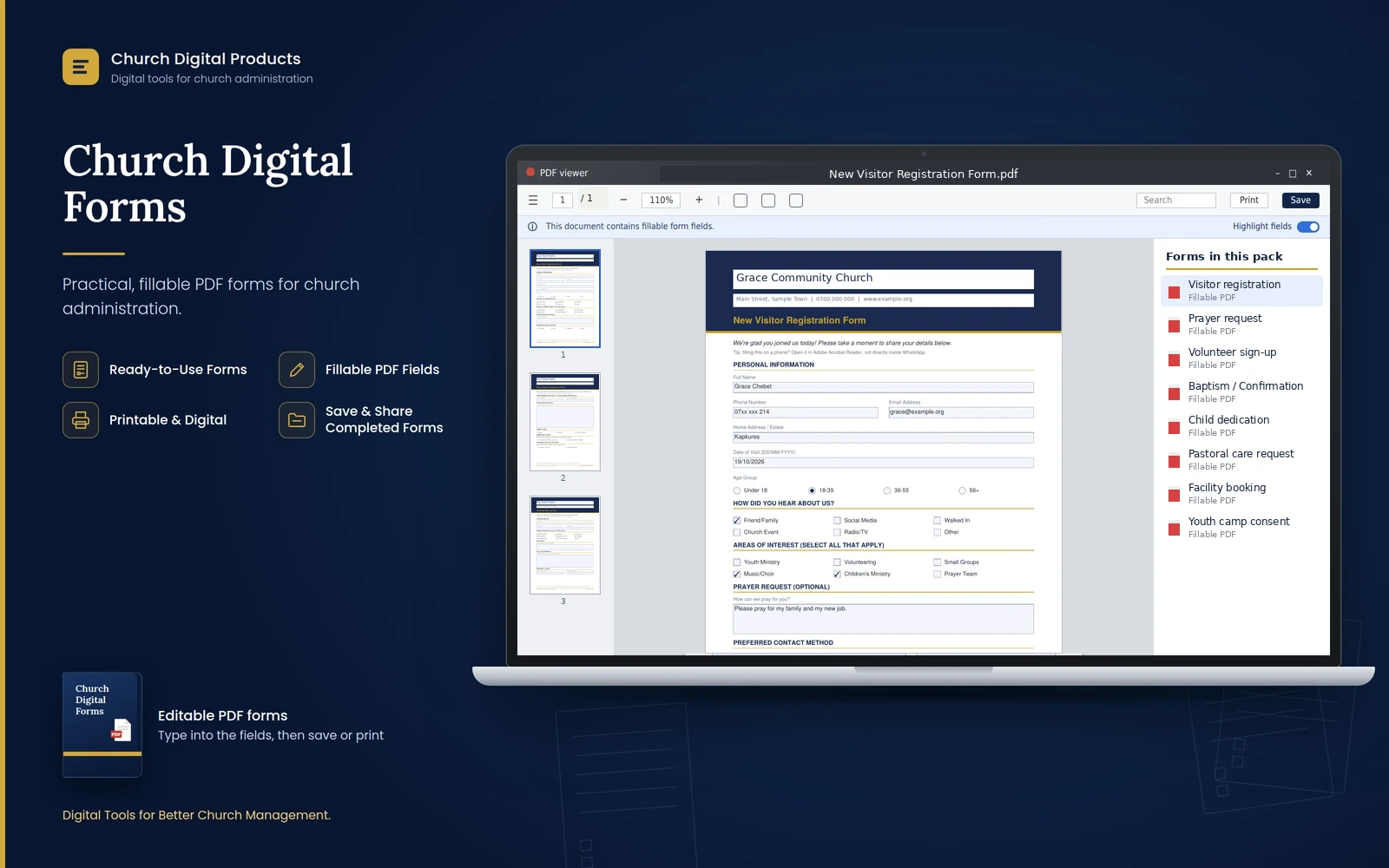
Eight ready-to-use fillable PDF forms for visitors, prayer, volunteers, baptism, child dedication, pastoral care, facility booking and youth camp consent, with print versions and a guide.
Price
Kshs. 499
Cart coming soon. Online ordering is not open yet.
What it is
The problem it solves
Who it is for
- Church secretaries and administrators who handle registrations and bookings
- Welcome and ushering teams who greet visitors
- Pastors and elders who take prayer and pastoral care requests
- Youth leaders who organise camps and retreats
- Small and medium churches of any denomination, with no special software needed
Key benefits
- Welcome first-time visitors and keep their details in one tidy form
- Take prayer requests with privacy choices: stay anonymous, share with the prayer team or keep confidential
- Sign up volunteers with their interests, availability, skills and an emergency contact
- Register baptism, confirmation and child dedication on a clear form
- Receive pastoral care requests with an urgency level and a confidentiality note
- Manage facility and equipment bookings, with an approval section for the office
- Get parental consent and medical information before a youth camp
- Put your church's own name and contact details on every form
- Fill in on a screen and send by email or WhatsApp, or print on A4
Key features
- Eight fillable PDF forms on A4 paper
- Eight ink-saving print versions with a plain header
- Your church name, address, phone and website typed once at the top
- Long-answer boxes that wrap and scroll as you type
- Tick boxes for "select all that apply" and round buttons for single answers
- A short privacy note on every form that collects personal details
- Works in the free Adobe Acrobat Reader, and in Chrome and Edge
- Ordinary PDFs with no macros, scripts or internet connection needed
- A 12-page user guide covering filling, saving, sharing, printing and looking after the information
Good to know
- The forms are fillable PDFs. You need a PDF reader; the free Adobe Acrobat Reader is the most reliable, and Chrome and Edge also work.
- The viewer inside WhatsApp and some email apps cannot be typed into. Save the PDF first, then open it in a PDF reader.
- The forms do not send answers to you automatically. People save the filled form and send it back by email or WhatsApp.
- The wording of the questions is fixed. You can type in every box, but changing the questions needs a PDF editor such as Adobe Acrobat Pro.
- The forms are set up for A4 paper.
- The Youth Camp form has a signature box: a parent can type their full name, or sign by hand after printing.
- The forms collect personal details, including children's and medical information. Keep completed forms safe and share them only with people who need them.
- The guide points to Kenya's Data Protection Act, 2019 but is not legal advice. Ask a qualified adviser about your church's duties.
- After you download the ZIP, unzip it to see the Fillable Forms and Print Versions folders.
Frequently asked questions
Do I need special software?
No. A free PDF reader is enough. Adobe Acrobat Reader is the most reliable, and Chrome and Edge can also fill in the forms.
Can people fill the forms in on their phones?
Yes, in a PDF app such as Adobe Acrobat Reader. They should save the PDF first and open it in the app, because the viewer inside WhatsApp does not allow typing.
Do the forms send the answers to me automatically?
No. The filled form is saved by the person and sent back to you by email or WhatsApp. Nothing is sent online by itself.
Can I put my church's name on the forms?
Yes. Type your church name, address, phone and website at the top of each form, then save a copy so you never have to retype them.
Can I change the questions?
You can type in every box, but the wording is fixed. Changing the questions needs a PDF editor such as Adobe Acrobat Pro.
What is the difference between the fillable and print versions?
The questions are the same. The fillable versions have a coloured header, and the print versions have a plain header that saves ink. You can type into both.
What paper size are they?
A4. For the best result, print at Actual size (100%).
How should we look after completed forms?
Keep digital copies in a protected folder and paper copies locked away, share them only with people who need them, and delete forms you no longer need. The guide explains this in more detail.