Church Events & Ministry Management System
An Excel system to plan your church's events and ministries: calendar, requirements, tasks, volunteers, programme, budget and evaluation, with one dashboard.
Price
Kshs. 799
Cart coming soon. Online ordering is not open yet.
What it is
The problem it solves
Who it is for
- Church administrators and secretaries who coordinate the programme
- Event coordinators and committee chairs who plan weddings, conferences, crusades and special services
- Ministry and department leaders who need to organise volunteers and tasks
- Treasurers who track what each event costs
- Small and medium churches of any denomination, with no Excel expertise needed
Key benefits
- Plan every event once, and see the whole year in date order on a calendar that builds itself
- Get a warning before two events use the same venue on the same day
- Know what each event still needs, with the shortfall worked out
- Give every task an owner and a due date, and see what is overdue
- Roster volunteers and see who has not confirmed
- Write a timed programme for a service, wedding or conference
- Plan event money line by line, and see planned against actual
- Learn from every event with ratings, lessons and follow-ups
- See what needs attention on one Dashboard, with a data check that catches broken links
Key features
- Start Here menu with a workbook map, and Settings with every dropdown list
- Event Planner for up to 200 events, with type, department, date, venue, coordinator, expected attendance and status
- Annual Church Calendar that builds itself in date order, with the day of the week and a venue check
- Event Requirements with quantity needed, available and shortfall
- Task Checklist with owners, due dates and status, and overdue tasks in red
- Volunteer and Duty Roster with contact, duty, date and confirmation
- Service Schedule with times, activities, durations and end times
- Event Budget with income and expense lines, planned and actual, and the variance
- Planned and actual costs that fill into the Event Planner by themselves
- Event Evaluation with five ratings, lessons learned and follow-ups with deadlines
- Ministry Tracker for up to 50 ministries, with leaders, meeting times and members
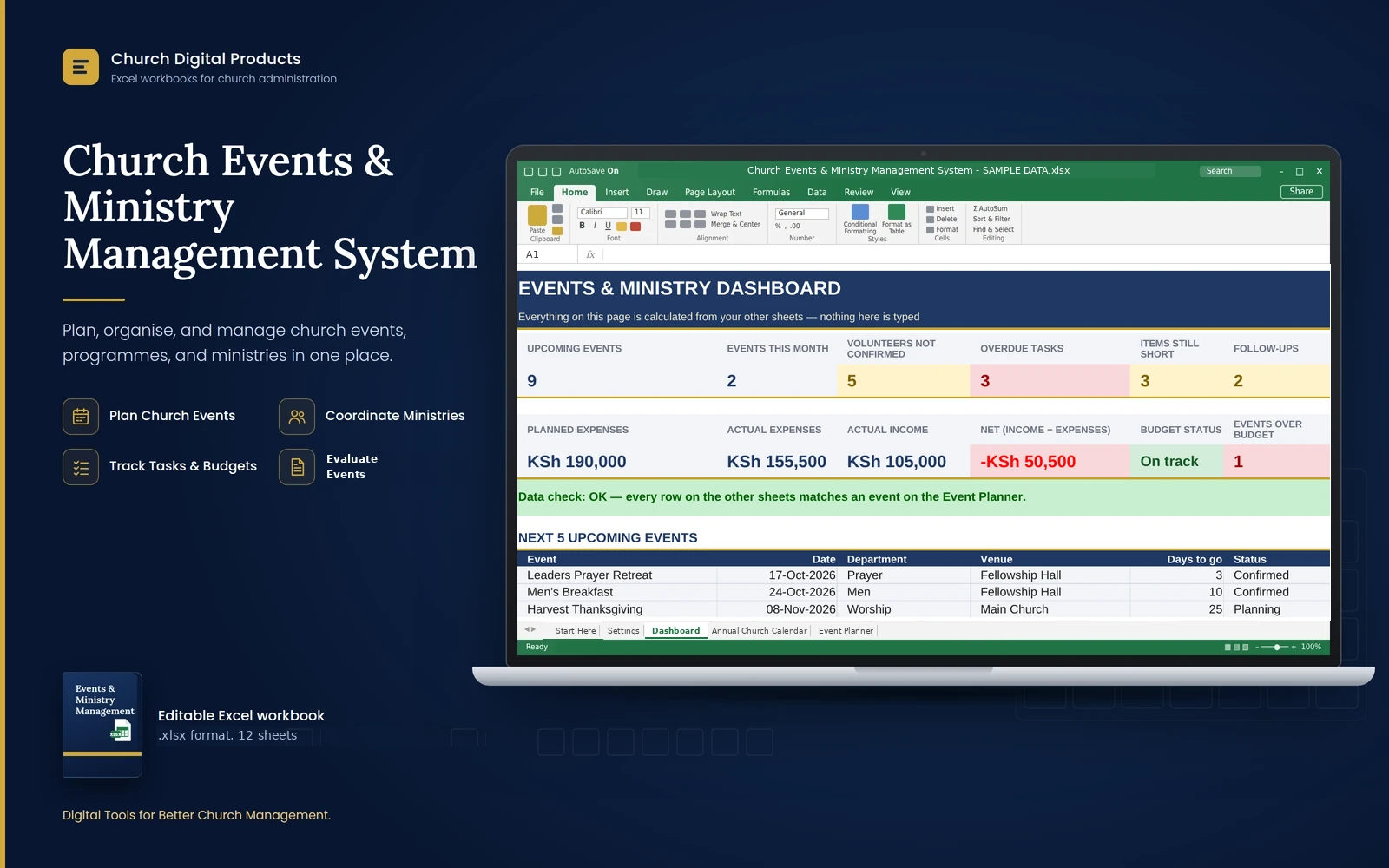
- Dashboard with twelve key figures, the next five events, events by department and status, and a data check
Good to know
- It works best in Microsoft Excel on a computer (a recent version is recommended) and also opens in LibreOffice Calc. Phones can open it, but typing records there is awkward.
- You type the entries yourself. It does not send reminders, emails or messages; it shows what needs attention with colours and counts.
- Events are linked by their name. Give each event a unique name, and pick it from the dropdown on the other sheets. If you rename an event later, the Dashboard's data check shows which rows to pick again.
- The Annual Church Calendar builds itself from the Event Planner. You do not type on it, and an event with no date is not on it.
- The Event Budget is for event costs only. It is not your church's accounts.
- Names and phone numbers of volunteers are personal data. Keep the file in a safe place and share it only with people who need it.
- Sheets are protected against accidental changes, but the protection has no password. Excel does not record who changed what.
- Capacity: 200 events, 300 requirement lines, 500 tasks, 500 volunteer rows, 300 programme lines, 500 budget lines, 100 evaluations and 50 ministries. The registers print their first 100 rows.
- After you download it, open the file and click Enable Editing.
Frequently asked questions
Do I need to be good at Excel?
No. You add each event once and pick it from a dropdown on the other sheets. The system does the counting, the colours and the calendar. The manual explains every step in plain language.
Do I have to type events on the calendar too?
No. The Annual Church Calendar builds itself from the Event Planner, in date order, with the day of the week and a venue check.
How does it warn me about clashes?
When two events that are not cancelled use the same venue on the same day, both rows show an amber "Venue also booked" on the calendar, and the card at the top counts them.
Do I have to list every Sunday service?
No. List the special ones, such as Easter, Harvest, communion Sundays and anniversaries. Regular weekly meetings can be recorded in the Ministry Tracker.
What happens if I rename an event?
Rows on the other sheets keep the old name. The Dashboard's data check turns red and shows how many rows no longer match, so you can pick the event again.
Does it track the church's accounts?
No. The Event Budget tracks the cost of each event, planned against actual. Keep your main accounts in your finance records.
What is the SAMPLE DATA copy for?
It is a practice file for a made-up church, with a year of events built out with requirements, tasks, volunteers, programmes and budgets, so you can see every sheet working. Never use it for real records.
Can I add my own event types, venues and departments?
Yes. On Settings, type new options in the next empty cell of the list. They appear in the dropdowns at once.