Church Membership & Attendance Tracker
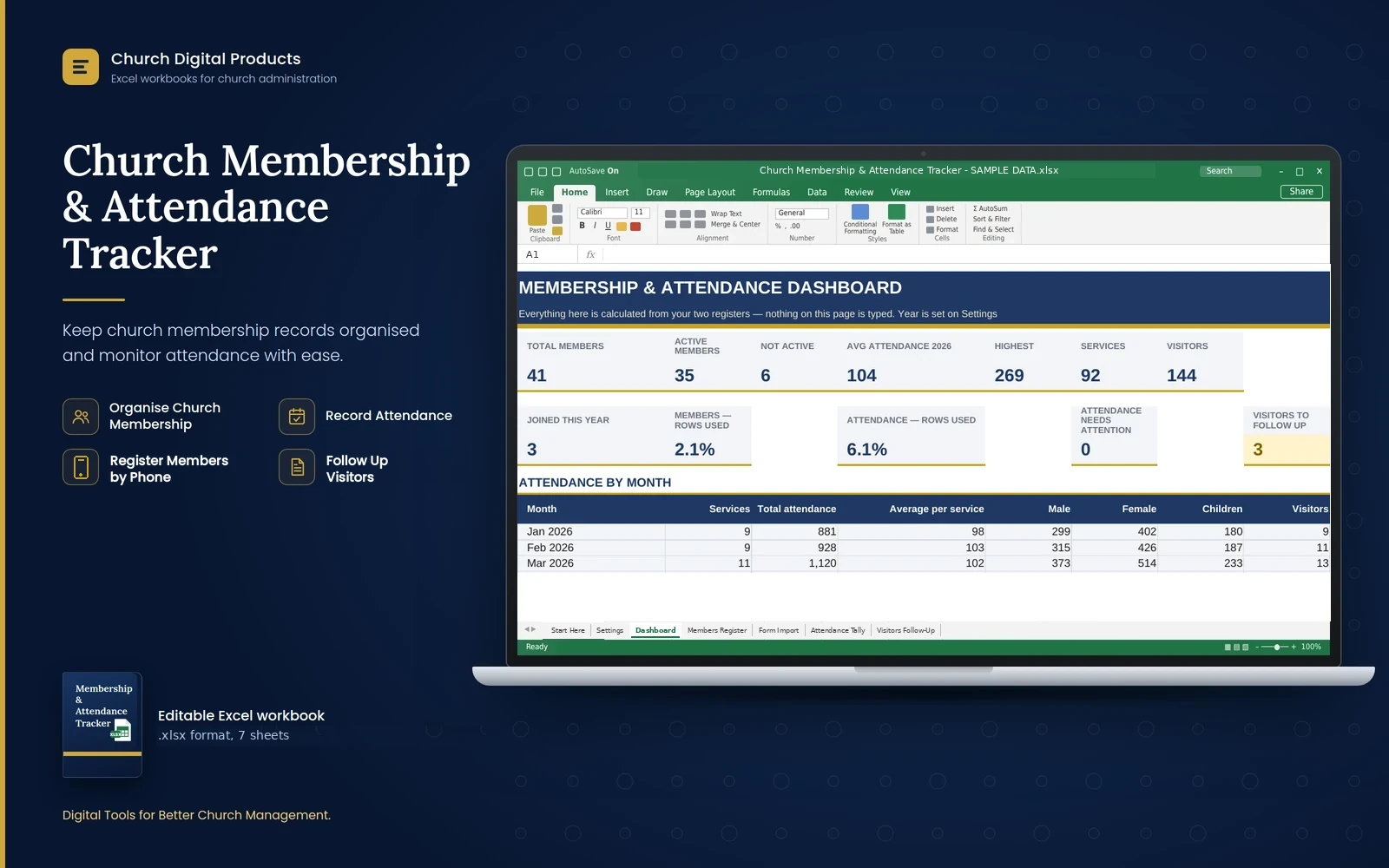
An Excel tracker for your church: a members register with quick search, attendance for every service, a visitors follow-up list and a dashboard, plus a Google form so members can register on their phones.
Price
Kshs. 699
Cart coming soon. Online ordering is not open yet.
What it is
The problem it solves
Who it is for
- Church secretaries and administrators who keep the members register
- Ushers and welcome teams who record attendance and first-time visitors
- Pastors and elders who want to see membership and attendance at a glance
- Fellowship and home-cell leaders who need to know who belongs to their group
- Small and medium churches of any denomination
Key benefits
- Keep one register of your members, with room for 2,000, and find anyone with Quick Search
- Record every service, with room for 1,500, and see monthly attendance and the average per service
- Compare your services: the first service, the second, the youth service and special events
- See your members by gender, age group, status and ministry, and filter them by fellowship or area
- Follow up first-time visitors, with room for 500, and see who is still waiting for a call
- Let members register on their phones, then bring their details into the register in a few minutes
- Phone numbers are tidied and anyone already registered is flagged when you import
- Look back at any earlier year by changing one setting
Key features
- Seven sheets: Start Here, Settings, Dashboard, Members Register, Form Import, Attendance Tally and Visitors Follow-Up
- A Dashboard with figures and charts calculated from your records
- Members Register with Area of Residence and Fellowship / Home Cell columns, and filter arrows on every column
- Duplicate names turn amber, and inactive members turn grey
- Form Import with a Check column that tells you what to do with every registration
- Dropdown lists you can change on the Settings sheet
- Formula cells are locked so they cannot be overwritten by accident (no password)
- No macros, and the workbook works without an internet connection
- A SAMPLE DATA copy for a fictional church, with 41 members, a year of services and 14 visitors
- A 19-page user manual and an 8-page Google registration form guide
Good to know
- You need Microsoft Excel on a computer. Excel 2016 or newer is recommended. It also opens in LibreOffice Calc. Phones and tablets can open it, but typing records there is awkward.
- When you first open the file from a download, Excel may show a yellow bar. Click Enable Editing, and then you can type.
- The registration form is a Google form that you build yourself in about 15 minutes, following the guide. It needs a free Google account for the church, and members need a phone with internet.
- Registrations do not reach the workbook automatically. The secretary downloads the responses from Google Sheets and pastes them into Form Import, which takes a few minutes each week or month.
- The form's answers stay in your church's own Google account. They are not sent to us.
- The form is for members, and for visitors who have decided to join. First-time visitors are recorded on the Visitors Follow-Up sheet.
- It does not connect to M-Pesa, a bank or any other church management system.
- The SAMPLE DATA copy contains made-up information and is for practice only. Do not use it for real records.
- The workbook holds names and phone numbers. Keep the file safe, share it only with people who need it, and check what data-protection rules apply to your church.
Frequently asked questions
Do I need Microsoft Excel?
Yes, on a computer. Excel 2016 or newer is recommended, and it also opens in LibreOffice Calc. No macros are needed.
Does it work without internet?
The workbook does. Only the optional registration form needs a free Google account for the church, and members with a phone and internet.
How do members register on their phones?
You build a Google form in about 15 minutes, following the guide, and share its link or QR code. Their answers collect in a Google Sheet in your church's account.
Do the registrations reach the workbook automatically?
No. The secretary downloads the responses, pastes them into the Form Import sheet, and copies the rows marked Ready into the Members Register. It takes a few minutes.
Can visitors use the form?
It is for members, and for visitors who have decided to join. Record first-time visitors on the Visitors Follow-Up sheet instead.
How many members, services and visitors can I record?
Up to 2,000 members, 1,500 services (about nine years at three services a week) and 500 visitors.
Can I change the ministries and other lists?
Yes, on the Settings sheet. If you change a list, change the matching question in the Google form to the same words.
Is my church's information sent to you?
No. What you enter stays in your own files, and the form's answers stay in your Google account.